Making My Own Discord Bot
Happy Labor Day! To celebrate, let’s talk about some work I’ve been doing this past week. I apologize to anyone who doesn’t find these kinds of dry technical details interesting.
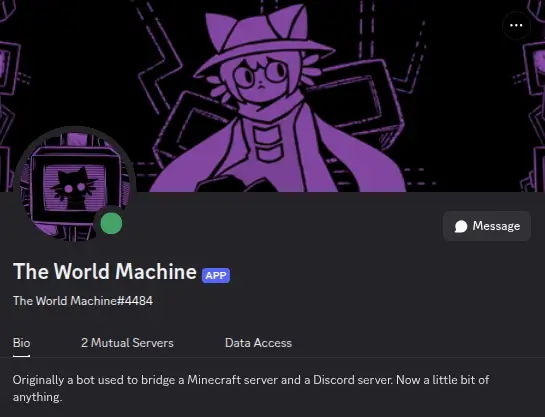
For a while now I’ve been running my own little Discord bot off an old Android tablet I had lying around. The poor thing got replaced and was just sitting on a shelf, and when I eventually had cause to spin up my own bot I remembered about it and decided to see if it was possible to run discord.py through Termux. As it turned out, it was, and although it was a little unreliable sometimes it served its job quite well. I stole an existing application from an older webhook used for a personal Minecraft server back in 2018 to be the face of it, and she’s been running with pretty serviceable uptime for a little over a year.
(Some fun trivia: she isn’t just named The World Machine due to my love of OneShot, although that’s a part of it. The Minecraft server she used to serve as a chat bridge for was actually the original version of ANTIVOID, and we named the computer that ran the gamemode The World Machine since it was a machine in charge of regenerating the world.)
If you know a little bit about me then the mention of discord.py might raise some eyebrows seeing as I almost exclusively write things in Lua, to the point where this entire website is generated by a Lua program I wrote by hand. I used discord.py at the time mostly as an excuse to use my favorite dice library. A friend of mine uses this library in his own bot, and after a while I personally fell in love with the syntax and flexibility of it. After finding a good excuse to set up a dice roller in a server, I set my own bot up as a dice roller instead of making the more sensible choice of using something like Dice Maiden, and it worked great for a long while.
The problem with using discord.py is that while I’m perfectly capable of writing Python code, I don’t find it very comfortable. I suspect the part of the language I have the most trouble with is the significant whitespace, but whatever it is, while I had initially had intentions of adding other features (primarily a deck handler for Eidolon: Become Your Best Self 2E for a campaign which is no longer running), after a time I just stopped working on it and left the bot where it was. Within the last couple of weeks I found myself thinking about adding features again due to a conversation about a type of bot a different, unrelated friend would would like to have in his own server, and I decided that it was about time to finally do something about the problem.
Moving to Discordia
When it comes to interacting with a RESTful API in Lua, there aren’t many options. For Discord’s API in particular I’m only aware of one: Discordia, a high-level wrapper for the Discord API built on top of a Lua environment called Luvit. Luvit provides the necessary Node.js-like asynchronous HTTP/S support required for REST, and Discordia makes the Discord API in particular easy to use and understand. It’s not entirely dissimilar to discord.py, just without all the same bells and whistles. Which is fine, because I can always write in the simple bells and whistles by myself. I happen to be the kind of person who really enjoys that kind of project.
Getting Discordia set up on an Android device turned out to be a bit of a pain, but it was conveniently enough of a pain to justify doing a little more work and changing my host device from last generation’s HD Fire to a completely different tablet I had sitting around. Specifically a Galaxy S6 Lite I’d meant to get rid of. The screen on the poor thing absolutely shattered due to Samsung’s crappy case design (which isn’t really Samsung’s fault, folio cases are in style right now) and my own slippery fingers (made much worse by a case that only holds the tablet in with magnets), which I might have just put up with if I didn’t buy the tablet I did for S-Pen support so I could use it for art. I ended up just buying a new one secondhand off the Internet, and I had intended to sell the shattered one off for parts to recoup some of the costs and just never did. Now it’s serving the purpose of your average Raspberry Pi, which is probably a slightly more dignified calling in life than being stripped down by a repair store? I have it sitting on my desk plugged in to a low-power charger (actually a powered USB hub) now, and I put a screen protector and the original magnetic folio case on it to keep it a little safer.
At any rate, Luvit comes with a very streamlined installation process which doesn’t work at all in Termux, which was a little annoying considering that Python seems to Just Work, but after some research I found out that it’s possible to trick Termux into running a “real” Linux environment, for a limited definition of “real.” PRoot is a userspace implementation of chroot, meaning you can use proot-distro to grab a full Linux userland and just run it through Termux, even including running a whole desktop, with a few concessions.
For the majority of people who don’t know what all of that means, chroot (“change root”) is an important Unix utility which allows you to change the effective root directory — the absolute top-level start of the filesystem — for a running program. If you change the current root directory to a different Unix filesystem, you can interact with that Unix installation from inside a different one. It’s very useful for system recovery; if your Linux computer stops booting, you can chroot into it from a live installation and fix whatever went wrong. Using chroot requires you to have root access, for obvious reasons, and you don’t have root access in Android unless you jailbreak the operating system, so proot is a close-enough reimplementation of chroot that gets around it by just faking being root instead.
After getting a generic Ubuntu or Debian (I don’t remember, and it doesn’t matter) distribution running with proot-distro, I found that Luvit still has some issues installing on ARM devices, and it really doesn’t like Termux. Thankfully some looking around brought me to an alternative install script that did what I needed, and after several tries I was finally able to install Discordia through lit, Luvit’s included package manager. From there I made a shortcut to a more convenient part of the storage, pasted in the example script, plugged my bot token into it, and it just worked great. As ever, the insanity of dedicated open-source developers always succeeds in getting any software to run on any hardware regardless of anyone else’s attempts to prevent it. Did you know you can play Lego Island or Space Cadet Pinball on a Nintendo 3DS?
Rolling My Own Dice
Of course, since this bot is supposed to be a dice roller, just getting Discordia working is only half the battle. I can’t use the Python dice library from Lua, sadly, so I implemented a stop-gap measure and started working on my own equivalent dice roller.
Making a dice roller, on the surface, isn’t hard. The actual coding part is very simple at least. Generate a few lists of random numbers between X and Y, and add a few functions that operate over those lists and add or remove results based on a few rules. Anyone could do it, so I will leave this part of the implementation as an exercise to the viewer. Parsing a normal dice expression and turning it into something usable is a little bit harder, but luckily, I have the ability to cheat.
Luxtre(’s parser) isn’t a fully-grown multi-purpose tool yet, not really, although I intend to turn it into one if I can ever make the time for that project. It’s designed very simply to take in Lua-like text and spit out text that’s 100% Lua compliant, and as far as performing that job it does it very well. Dice rollers don’t work on very Lua-style elements, but you can do a lot with a little coercion. Luxtre isn’t built to evaluate over the AST either, partially because I don’t really know how you’re supposed to do that and partially because it doesn’t need to. What it can do very well is take a piece of input alongside any grammar which can be written in EBNF and output semantically correct Lua code, and it can do that with a relative minimum of effort.
I have to do a little bit of cheating, because Luxtre’s tokenizer is not (currently) reprogrammable (I would like to implement something similar to Marpa‘s scanless interface in the future, but that’s a topic for another time). Specifically, before any text is given to the parser I first add spaces to the left and right of any alphabetic character or’.’ in the input so that they’re always interpreted as individual tokens. Otherwise, ‘rx’ would be interpreted as a single keyword instead of two keywords, ‘r’ and ‘x’, and using ‘.+’ for vector operations would cause the period to be consumed by the preceding number as a decimal place.
This is the actual grammar used by the dice roller, exactly as it was written in EBNF while I was planning out the feature. Note that anything after a ‘>’ is a shorthand for the rough code that should be generated by that rule and not actually part of the production rule itself.
START = element_list > return { element_list } ;

element = num ;
element = roll ;
element = arith ;
element_list = element {',' element} ;

(* List literals are almost entirely for testing. The same list with the same modifiers should always give the same output. *)
roll = '[' element_list ']' > rlist{ element_list } ;

binop = '+' |
        '-' |
        '*' |
        '/' |
        '^' |
        '%' ;

unop = '-' ;

num = Number |
      unop num |
      roll |
      '(' num ')' |
      '(' arith ')' ;

arith = num binop num;

amount = num ;
threshold = num ;

normal = [amount] 'd' num > roll(amount, num) ;
percentile = [amount] 'd' '%' > roll(amount, 100) ;
fate = [amount] 'd' 'f' > roll(amount, 1, true) ;
fudge = [amount] 'u' num > roll(amount, num, true) ;
wild = [amount] 'w' num > wild(amount, num) ;

(* If [amount] is not present, it defaults to 1. *)

roll = normal | percentile | fate | fudge | wild ;

roll = roll 'x' [threshold] > roll:explode(threshold) ;
roll = roll 'r' [threshold] > roll:reroll(threshold) ;
roll = roll 'R' [threshold] > roll:reroll(threshold, true) ;
roll = roll 'a' [threshold] > roll:again(threshold) ;
roll = roll 'm' [threshold] > roll:minimum(threshold) ;
roll = roll 'h' [amount] > roll:keep(1, amount) ;
roll = roll 'l' [amount] > roll:keep(-1, amount) ;

(* If [threshold] or [amount] is not present it defaults to nil, and the functions set the default. *)

roll = roll 's' > roll:sort() ;
roll = roll '.+' num > roll:scalar(num) ;
roll = roll '.-' num > roll:scalar(-(num)) ;

(* The following functions compress a roll to a single integer, so they have to produce <num> instead of <roll> so no other operators can come after. *)
num = roll 'e' [threshold] > roll:success(threshold) ;
num = roll 'f' [threshold] > roll:success(threshold, true) ;
num = roll 't' > roll:total() ;
I ended up adding a couple rules in practice to define the highest and lowest “face” in an arbitrary list, so as to make testing various operators easier. Luxtre can parse anything that can be written in BNF, and the grammar syntax it takes in is very similar to normal EBNF. This is a sample of the final grammar used in the dice roller.
chain_operator -> x {% return ":explode(%s)" %}
chain_operator -> r {% return ":reroll(%s)" %}
chain_operator -> R {% return ":reroll(%s, true)" %}
chain_operator -> a {% return ":again(%s)" %}
chain_operator -> m {% return ":minimum(%s)" %}
chain_operator -> h {% return ":keep(1, %s)" %}
chain_operator -> l {% return ":keep(-1, %s)" %}

roll -> roll chain_operator [threshold] {%
    self.children[1]:print(out)
    local rhs = self.children[2]:print()
    out:push_catch()
    self.children[3]:print(out)
    local arg = out:pop()
    if arg == "" then arg = "nil" end
    out:line():append(rhs:format(arg))
%}
Very simple. And at the end, it generates a string that looks something like this:
return { roll( 4 , 6 ) :explode(nil) }
The dice roller on the Lua side is just a constructor with a metatable, and that metatable points to all the “operator” functions as well as several arithmetic metamethods and a custom __tonumber field for compressing a list of rolls to a single number whenever math comes along. The chaining syntax isn’t actually necessary, but it doesn’t slow the execution down enough to matter and it makes it easier to debug later.
And there we have it: a dice roller that can do some real funky
tricks like rolling (1d4 + 2)d(2d8) dice, which somehow
runs faster than the old Python version did. I’m not sure if that’s
because Python is slow or because the new hardware is fast, but I don’t
much mind it either way.
A Few Extra Features Just For Me
Having a bot that only rolls dice is a little bit of a waste, of course, even if it’s a very nice dice roller, especially since I went through all this effort to make it easier to add extra features. So I’ve already supplemented the dice roller with a couple other fun things.
The entire bot runs through Luxtre, because Luxtre allows me to use Python-like decorators. Since I’m loading all of my extra modules at runtime anyways, that makes it really easy to add in a hot-reloading function. I have a command that reloads all the modules from disk, for development, and a command that pulls the latest changes from GitHub before reloading, for pushing to the live bot. It’s very useful.
Slightly less useful but a whole lot more fun, all my commands go through a single ‘@command’ decorator. An extra feature of the decorator is that if the next message sent in the channel a command was run in happens to contain a variant of the word “thanks”, my bot sends back a nice message. if it instead contains one of a certain set of text emoji, it sends that emoji back.

I’ve also added a feature where using the command !reactbot or pinging the bot with any message with the word “reactbot” in it has it send back a random message from JacksFilms’ ReactBot in text format, just for fun. Sooner or later I’ll add a Magic 8-Ball command too.
Closing Thoughts
There’s always more to do with the bot, if I so feel like it. I’m working on one particularly complex feature already, and I have a small list of ideas, but it could really go on forever. I’ve already found a number of little issues with Luxtre from using it in this slightly incorrect way, and that’s just as valuable to me as the bot. I enjoy using my own tools and figuring out where they can be improved.
I don’t currently have any plans to open-source the code I’ve put together for this bot, and I don’t know if that’s changing any time soon. It’s really not too difficult to make your own simple Discord bot if you know a little programming, and it’s pretty fun. I made a different bot years ago with a completely different purpose, and that was fun too. If this is the kind of thing you’re into, I’d recommend trying it. But that’s just my two cents.


